
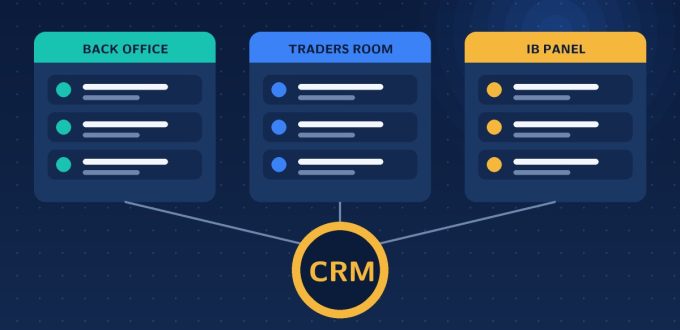
If you are shopping for a forex CRM, you will quickly meet a pile of overlapping terms: CRM, back office, traders room, client portal, traders cabinet, IB panel. Vendors use them inconsistently, which makes comparing products harder than it should be. They describe different parts of one system. This guide separates them so you know exactly what you need and what you are being sold.
The short answer
- Forex CRM is the whole system.
- Back office is the staff-facing side of it.
- Traders room (also called traders cabinet or client portal) is the client-facing side.
- IB or partner panel is the introducer-facing side.
Each is a different interface onto the same underlying data: clients, trading accounts, transactions and commissions.
What a forex CRM is
A forex CRM is the layer that connects your trading platform to the people and money around it. Unlike a generic sales CRM, it understands trading accounts, balances, deposits, withdrawals, leverage, groups and commissions, and it talks directly to MetaTrader through the manager API. That connection is what lets account creation, transactions and reporting happen automatically instead of by hand. For a full feature breakdown see our complete forex CRM guide.
What the back office does
The back office is where your team runs the business. Typical functions include:
- Approving or rejecting new accounts and KYC documents
- Approving deposits, withdrawals and internal or external transfers
- Approving IB and affiliate applications and setting their commission structures
- Managing groups, leverage and account types
- Handling support tickets and internal chat
- Reviewing statistics: total deposits, withdrawals, profit and loss, commissions
- Controlling staff roles and permissions
On our Forex CRM, for instance, all deposits and withdrawals are listed with approve and reject actions, and KYC documents sit in one place with one-click approval.
What the traders room does
The traders room is what your clients see and use. It is your brand’s front door after the website. A good one lets a client:
- Register and complete verification
- Open live and demo trading accounts
- Deposit through your payment methods and request withdrawals
- Transfer funds between their own accounts
- Download the trading platform
- Contact support and track tickets
It also carries your reputation. Slow, manual or confusing flows here are the quickest way to lose clients. The detail is covered in our guide to the forex traders cabinet, and you can see ours at Traders Cabinet.
What the IB and partner panel does
If you grow through introducing brokers and affiliates, they need their own portal to see referrals, trading activity and commissions. Behind it sits the commission engine, including multi-tier structures. See how this works in IB and affiliate management in a forex CRM.
How the three connect
The power of the setup comes from shared data. A client registers in the traders room. The back office sees the new profile and KYC documents instantly. Approval creates the trading account on the platform through the manager API. The client deposits; the transaction appears in the back office for approval or processes automatically; the IB panel updates the referrer’s commission. One action, three views, no re-keying.
When these components are bought separately from different vendors, the gaps between them become your problem: duplicate data, delayed syncing and manual reconciliation.
Common misunderstandings
- “We have a CRM, so we have a traders room.” Not necessarily. Some products are back-office only and need a separate client portal.
- “A traders room is just a login page.” A real one handles money movement, which is the hardest part to automate.
- “A generic CRM can do this with customisation.” Generic tools lack trading-account logic and platform synchronisation, so you end up building it yourself.
What to look for when comparing products
- Are all three layers included, or only one?
- Is the platform connection live and bidirectional through the manager API?
- How automated are deposits, withdrawals and transfers?
- Can you brand the client-facing side fully?
- Does it support the IB structure you plan to run?
If you are weighing options, our guide on how to choose a forex CRM turns this into a set of questions to ask any vendor, and forex CRM pricing explains what to expect to pay.
Frequently asked questions
Is a traders room the same as a forex CRM?
No. The traders room is the client-facing part of a forex CRM, where traders register, verify, deposit, withdraw and manage accounts. The CRM is the whole system, including the staff-facing back office and usually a partner or IB portal.
What is the difference between a back office and a CRM?
The back office is the staff interface within a forex CRM, used to approve KYC and transactions, manage groups and leverage, set IB commissions and view reports. The CRM is the umbrella that includes it.
Do I need all three modules to launch a brokerage?
In practice yes, even if a vendor packages them differently. You need somewhere for clients to operate, somewhere for staff to control operations, and a way to manage introducing partners if you plan to use them.
What does traders cabinet mean?
Traders cabinet is another name for the traders room or client portal: the branded area where your clients manage their trading accounts and money.
Want to see all three layers working together? Explore our Forex CRM and Traders Cabinet, or request a demo.